Settings
Locations: Tools menu, Tools toolbar
Shortcut: F10
Settings are stored as a JSON file in the application support directory: ~/Library/Application Support/DJV on macOS, %APPDATA%\DJV on Windows, ~/.config/DJV on Linux. The path is shown in Help > System Information.
The Settings tool is divided into collapsible sections:
- Cache — Memory cache sizes for video, audio, and read-behind (see Files).
- File Browser — Whether to use the native or built-in file browser, and whether the built-in one opens in a window of its own (see Files).
- Image Sequences — How audio is paired with image sequences, and what happens where a sequence is missing frames (see Files).
- OTIO — How the spatial coordinates in OTIO files are used to size and position images, and whether to enable workarounds for timelines that do not conform exactly to specification (see Files).
- Mouse — Mouse button bindings and scaling (see below).
- Playback — Options such as whether playback starts automatically when a file is opened.
- Audio — The size of the buffer the audio device is given. Increase this if the audio breaks up during playback.
- Keyboard Shortcuts — All keyboard shortcuts (see below).
- Style — Interface colors, scale, and whether tooltips are shown (see below). Auto follows the display; a chosen scale is kept.
- Time — Default time units (frames or timecode).
- FFmpeg — Built-in FFmpeg decoding options, and where to find the external FFmpeg command, used for what the packaged FFmpeg cannot decode (see Files) and for the movie export presets marked ffmpeg command (see Export).
- USD — Options for the experimental USD renderer (see Files).
Use the button at the bottom of the tool to save the settings manually.
Mouse
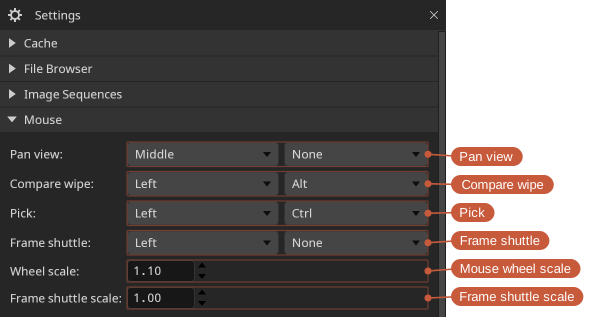
The Mouse section maps mouse buttons (and optional modifier keys) to different actions.
Keyboard shortcuts
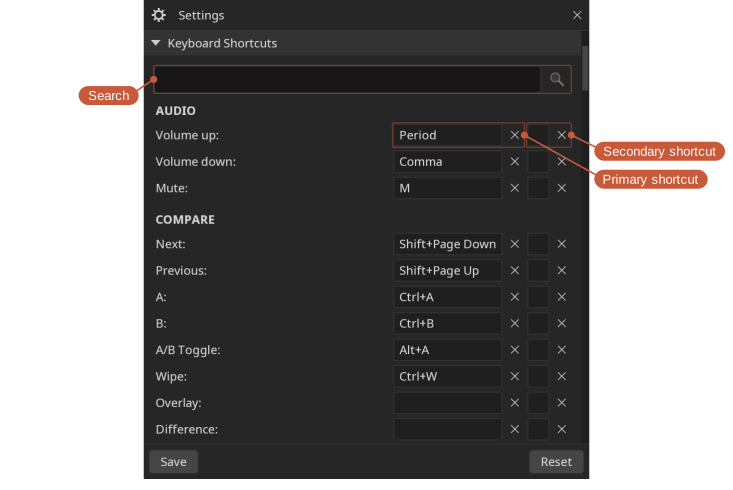
Each action can have a primary and a secondary shortcut, in the two columns of the table. To set one, click it in the table and press the new key combination; to remove it, click it and then the clear button beside it. A shortcut is shown in red if it conflicts with another. The arrow keys move between the shortcuts and Return edits the current one; Return again, or Tab, leaves it unchanged. The search box helps find an action by name.
Fonts
The interface is drawn with the fonts DJV ships; there is nothing to set. A pan-CJK font is included as a fallback, so Chinese, Japanese, and Korean file names are rendered without any setting up.