Timeline
By default, the timeline is minimized and shows only the first video and audio track. To see every track, toggle the minimized state from the Timeline menu.
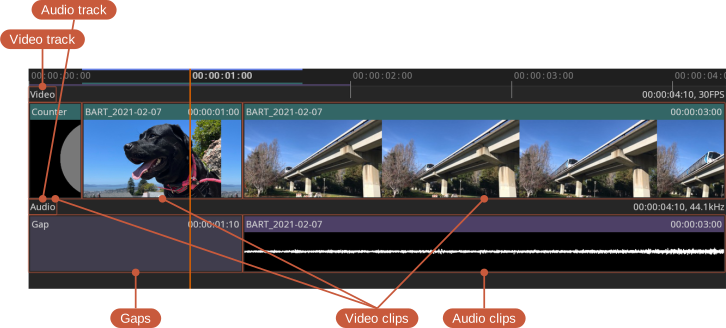
The current frame is the red vertical line. The in/out range is represented by the blue line at the top of the timeline. The cache is represented by the green and purple lines.
Default timeline controls:
- Change current frame — Left mouse button
- Zoom — Mouse wheel, or the - and = keys
- Frame view — Backspace
- Pan — Middle mouse button
Resting the cursor on the timeline shows a preview of the frame under it, drawn the way the view would show it, with the frame's time. Hover Preview in the Timeline menu turns it off. The preview is shown while playback is stopped.
Compare Timelines in the Timeline menu shows the timeline of each file being compared under the current file's, which is useful when the files are two cuts of the same edit. It is off by default.
The video thumbnails and audio waveforms can be toggled and sized independently from the Timeline menu. Turning them off saves vertical space and improves performance; with both off, the timeline is a compact strip with just the current frame, in/out range, and cache.